
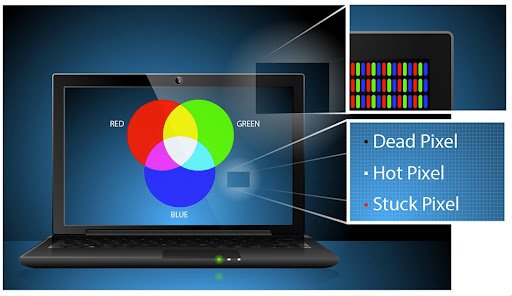
Laptop screens are essential for productivity, entertainment, and communication. However, over time, display issues can arise—one of the most common being dying pixels. These small defects can affect the viewing experience and may indicate underlying screen problems.
This article explains what dying pixels are, their causes, how to fix them, and tips to prevent them.
What Are Dying Pixels?
Dying pixels laptop are pixels on a laptop screen that no longer display colors correctly. They may appear dim, discolored, or partially functional. Unlike dead pixels, which are completely black and non-responsive, dying pixels still show some activity but not as expected.
When they fail or degrade, the display quality is affected.
Types of Pixel Issues
Understanding the difference between pixel problems helps in choosing the right solution.
Dead Pixels
Completely non-functional pixels that appear black and do not change color.
Stuck Pixels
Pixels stuck on a single color (red, green, or blue) and do not respond properly.
Dying Pixels
Pixels that are fading or showing inconsistent colors, often a sign of gradual failure.
Causes of Dying Pixels
Several factors can lead to dying pixels on a laptop screen.
Manufacturing Defects
Some pixels may fail due to imperfections during the manufacturing process.
Physical Damage
Pressure on the screen, drops, or impacts can damage pixels.
Aging Display
Over time, screen components wear out, leading to pixel degradation.
Overheating
Excess heat can damage internal components, including pixels.
Moisture or Dust
Exposure to moisture or dust can affect the screen’s performance.
How to Identify Dying Pixels
You can check for dying pixels using simple methods.
Visual Inspection
Look closely at the screen for dim or discolored spots.
Solid Color Test
Display solid colors (white, black, red, green, blue) and check for irregularities.
Online Tools
Use pixel-testing tools available online to detect screen issues.
Fixes for Dying Pixels
While not all dying pixels can be repaired, some methods may help improve or fix the issue.
Pixel Fixing Software
Certain tools rapidly change colors on the screen to stimulate stuck or fading pixels.
Gentle Pressure Method
Applying light pressure with a soft cloth on the affected area may sometimes restore pixel function. (Use caution to avoid further damage.)
Screen Massage Technique
Gently rubbing the area in circular motions can help revive some pixels.
Restart and Update Drivers
Sometimes, display issues may be software-related. Updating graphics drivers or restarting the system can help.
Professional Repair
If the problem persists, replacing the screen may be the best solution.
When to Replace the Screen
You should consider screen replacement if:
- The number of dying pixels increases
- The issue affects visibility and usability
- The laptop is under warranty (check for replacement policies)
In many cases, manufacturers have specific policies regarding pixel defects.
Prevention Tips
Preventing dying pixels is possible with proper care.
Avoid Physical Pressure
Do not press hard on the screen or place heavy objects on the laptop.
Keep the Laptop Cool
Ensure proper ventilation to prevent overheating.
Clean the Screen Properly
Use a soft, dry cloth and avoid harsh chemicals.
Handle with Care
Avoid dropping or mishandling the device.
Use Screen Protectors
Protective layers can reduce the risk of damage.
Benefits of Early Detection
Identifying pixel issues early can help:
- Prevent further damage
- Maintain screen quality
- Save repair costs
- Ensure a better user experience
Conclusion
Dying pixels on a laptop can be a frustrating issue, but understanding their causes and solutions can help you manage the problem effectively. While some fixes may restore pixel function, severe cases may require professional repair or screen replacement.
By taking preventive measures and handling your laptop with care, you can extend the life of your screen and enjoy a better viewing experience.
